One Thing Next
A minimal anti-overwhelm task app for iPhone and iPad that helps you focus on the next action only — so you can start without a huge list.
On this page
When you feel overwhelmed, the problem is rarely motivation. It’s too many choices at once.
One Thing Next is a minimal task tool that helps you focus on the next action only — so you can start without staring at a huge list.
Download on the App StoreWhat this helps with
This app is built for moments like:
- You have a list… but can’t start
- Everything feels urgent at once
- You bounce between tasks and finish none
- You over-plan, then shut down
- You need a “next step” that doesn’t require thinking
Before and after using One Thing Next
Before
- A long list that feels impossible to start
- Constant switching between tasks
- Decision fatigue
- Guilt for not doing everything
After
- One clear next action
- Less mental noise
- Easier to begin
- Momentum builds naturally
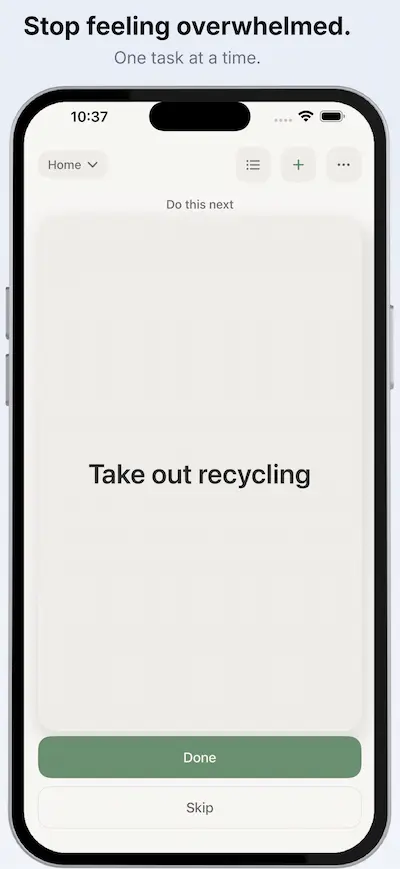
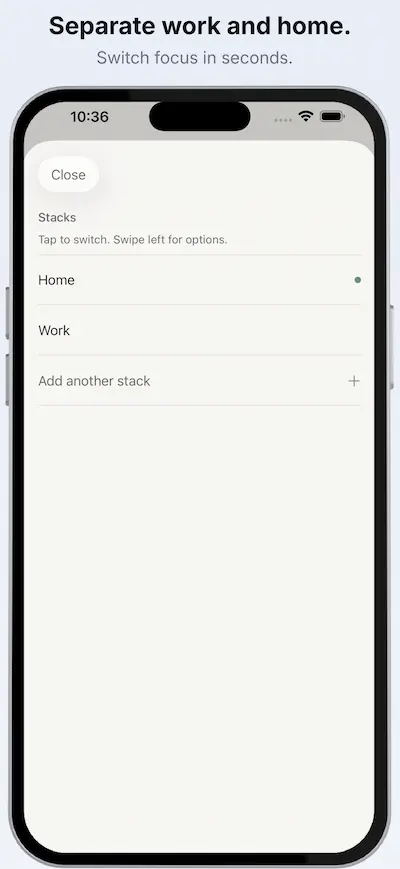
See One Thing Next in action
How it works
- Capture tasks quickly
- Organise them into simple stacks (for example, “Home” and “Work”)
- The app shows you one next action, not a wall of tasks
- Complete it and move to the next
Why it reduces overwhelm
A big list isn’t just information. It’s a stream of decisions.
When you only see the next task, you reduce:
- choice overload
- context switching
- the feeling that everything matters equally
Less decision pressure means you can actually start.
Who it is for
One Thing Next is for people who get stuck when a task list becomes too big.
It can be especially helpful for:
- ADHD-style overwhelm
- anxiety-driven overplanning
- switching between work and home tasks
- shutdown or “I can’t start” moments
Frequently asked questions
Is this a full project manager?
No. It’s intentionally minimal. The point is to help you start.
Does it work offline?
Yes.
Is it free?
Core features are free. Some advanced features (such as multiple stacks or voice input) require an in-app purchase.
Related guide
If you’re stuck and need a calm way to start, this guide can help:
How to Start When You Feel Overwhelmed
Need help? Visit support