Calm Schedule
A visual schedule app for iPhone and iPad that helps autistic and neurodivergent children handle transitions more calmly using real-life photos from your home.
On this page
Transitions can feel small to adults — but overwhelming to children.
When the next step is unclear, resistance grows. Calm Schedule makes daily transitions visible and predictable using real-life photos from your own environment.
A photo of your toothbrush, your front door, or your coat can feel more concrete than a symbol. When recognition is instant, there’s often less uncertainty — and less pushback.
Download Calm Schedule for iPhone & iPadWhat Calm Schedule helps with
This app is designed for neurodivergent families, including autistic children who find transitions hard.
It’s especially useful for:
- Ending screen time (tablet / iPad)
- Morning routines
- Bedtime routines
- Leaving the house
- Homework transitions
- After-school decompression routines
Before and after using a visual routine
Before
- Repeated reminders
- Negotiation or arguing
- Sudden endings that feel “unfair”
- Emotional escalation
After
- Clear next step (visible, not argued)
- Less verbal prompting
- More predictable endings
- Faster recovery after a wobble
See Calm Schedule in action
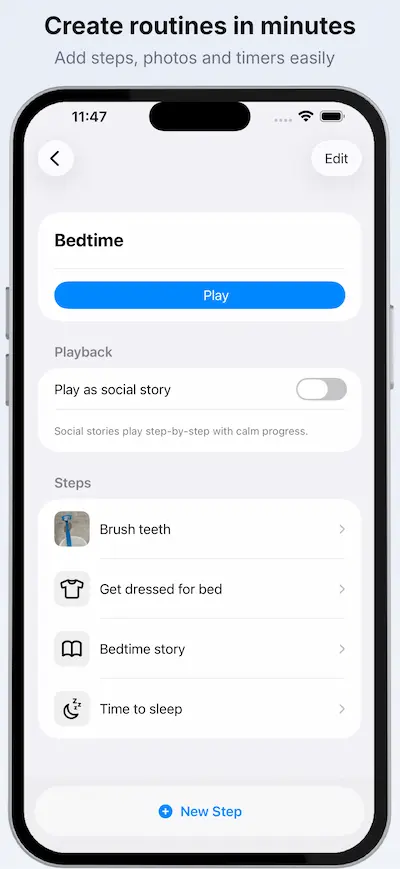
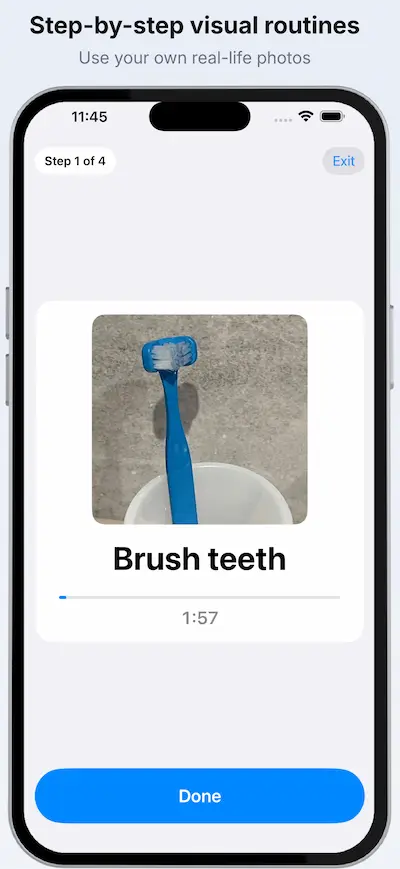
How it works
- Create a routine (for example: “Morning”, “After School”, “Bedtime”)
- Add steps using your own photos
- Press play and follow one step at a time
- Use the timer to make endings predictable
The goal is not perfection. The goal is clarity.
Why real photos can reduce transition stress
Many visual schedule tools use generic symbols. They can work — but some children don’t connect with them.
A real photo from your home can be:
- more concrete
- easier to recognise instantly
- less open to debate (“that’s not my toothbrush”)
When recognition is immediate, you often get less pushback.
Make screen time endings calmer
If your child melts down when screen time ends, you already know this isn’t about being “naughty”.
Often it’s:
- the transition itself
- the loss of control
- the uncertainty of what happens next
A visual routine reduces the uncertainty.
Example routines:
- “iPad → Dinner”
- “iPad → Bath → Bed”
- “iPad → Snack → LEGO”
Tip: add a bridge step (snack, squeeze, a short walk) so it doesn’t feel like falling off a cliff.
Prepare for rare or stressful appointments
Some of the hardest transitions aren’t daily — they’re the rare ones:
- Dentist
- Doctor / hospital
- Haircut
- Vaccinations
- Travel days
- New school events
Because they happen less often, they can feel unpredictable and threatening.
Calm Schedule helps you prepare by making the sequence visible ahead of time.
Example:
- Shoes on
- Car
- Dentist
- Waiting room
- Dentist chair
- Home
You can add a reassuring “after” step your child looks forward to (“Park” / “Snack”) to make the ending clearer.
Frequently asked questions
Does Calm Schedule work on iPad?
Yes — it works on both iPhone and iPad.
Does it work offline?
Yes. Once routines are created, you can use them without an internet connection.
Is it free?
Core features are free. Some advanced features (such as multiple profiles or social story mode) require an in-app purchase.
Can I use my own photos?
Yes — that’s the point. Use photos of your real environment so the next step feels concrete.
Is this only for autistic children?
It was built with neurodivergent children in mind, but many families use it for general routine support.
Ready to make transitions calmer?

Related guide
If you’re working specifically on ending tablet or iPad time more calmly, start here:
How to End Screen Time Without a Meltdown
Need help? Visit support